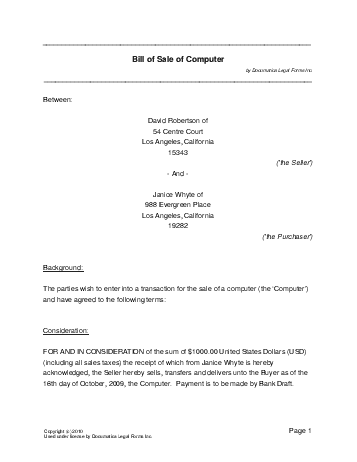
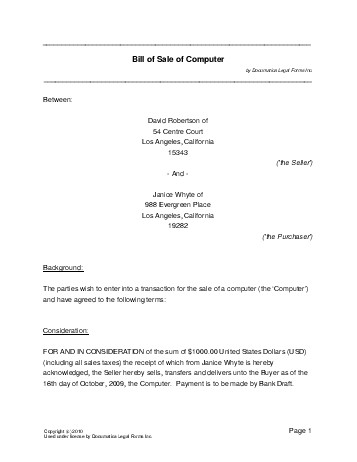
USA Computer Bill of Sale
Change Version: Canada

This document is FREE


PDF Computer Bill of Sale Form

This document is similar to a bill of sale. It includes basic information such as the buyer, seller, payment amount, payment method, and currency. However, the computer bill of sale form allows the description of specific technical information and features relevant to the sale of computers or laptops. It also allows for the seller to offer a warranty if they wish.

More about Computer Bill of Sale legal forms.

  • Proceed through this form, providing as much information as possible.
  • Do not use the '&' (ampersand) and '"' (double-quotation mark) characters.
  • When you are done, click on 'Build Document' at the bottom.


Seller Details:

Number of sellers:


Seller's Contact Information:

First Seller's Contact Information:

Full Name:


Address:


City:


Country:


Select a state:


Select a province:


Zip Code:


Second Seller's Contact Information:

Full Name:


Address:


City:


Country:


Select a state:


Select a province:


Zip Code:


Buyer Details:

Number of buyers:


Buyer's Contact Information:

First Buyer's Contact Information:

Full Name:


Address:


City:


Country:


Select a state:


Select a province:


Zip Code:


Second Buyer's Contact Information:

Full Name:


Address:


City:


Country:


Select a state:


Select a province:


Zip Code:


Consideration:

What is the purchase price? (e.g. 1250.00)


Select the currency:


Are sales taxes included in the purchase price?
Yes No

Select the method of payment:


Method of payment:


Basic Computer Specifications:

Make (e.g. Sony):


Model (e.g. Vaio):


Serial Number:


Style:


Technical Specifications:

Select the features you wish to specify:

Hard Drive Capacity
Yes No

Enter the capacity, in GB (e.g. 40):


Battery Condition
Yes No

The battery capacity is:


Processor Type
Yes No

Type (e.g. Intel Pentium 4):


Processor Speed
Yes No

Enter the speed, in MHz:


RAM (Base)
Yes No

Enter the amount of Ram that came with the computer, in MB:


RAM (Any Additional Installed)
Yes No

Enter the amount of additional RAM installed, in MB:


Monitor Size
Yes No

Enter the size of the monitor, in inches (e.g. 17):


Monitor Resolution
Yes No

Enter the resolution (e.g. 800 x 600):


Monitor Style
Yes No

Select the style:


Is there a floppy disk drive?
Yes No

Select the CD/DVD capabilities:


Extra Features:

Is an instruction manual included?
Yes No

Is there some time remaining on the manufacturer's warranty?
Yes No

How much time is left? (e.g. 3 years, 4 months, etc)


Are there other features you want to describe?
Yes No

Describe the features here:


Physical Condition:

Is there any cosmetic damage that does NOT affect the function?
Yes No

How many areas of damage are there?


First Cosmetic Damage:


Second Cosmetic Damage:


Third Cosmetic Damage:


Fourth Cosmetic Damage:


Fifth Cosmetic Damage:


Is there any physical damage that DOES affect the function?
Yes No

How many areas of damage are there?


First Damage:


Second Damage:


Third Damage:


Fourth Damage:


Fifth Damage:


Date of Transaction:

Do you know when the transaction will take place?
Yes No

Day (e.g. 19):


Month (e.g. June):


Year (e.g. 2006):


Signatures Required:

To ensure the validity of this document, we recommend the presence of one or more witnesses and a notary public.
Will the Buyer(s) be signing?
Yes No

How many witnesses will be present?


Will a notary public be present?
Yes No

Seller(s) will be signing in:


State:


Province:


Buyer(s) will be signing in:


State:


Province: